Front-frame design
A standalone touch frame built around your existing display—not a replacement screen.

The TOUCHEVA touch frame
Add direct finger and pen control to the MacBook you already use. TOUCHEVA frames the existing display, connects to macOS, and is ready without a separate driver.
Touch frame accessory only. MacBook and display not included.

Meet TOUCHEVA
The frame sits around your existing display and connects to your MacBook through USB-C. Your screen stays in place; TOUCHEVA adds the touch input.

A standalone touch frame built around your existing display—not a replacement screen.
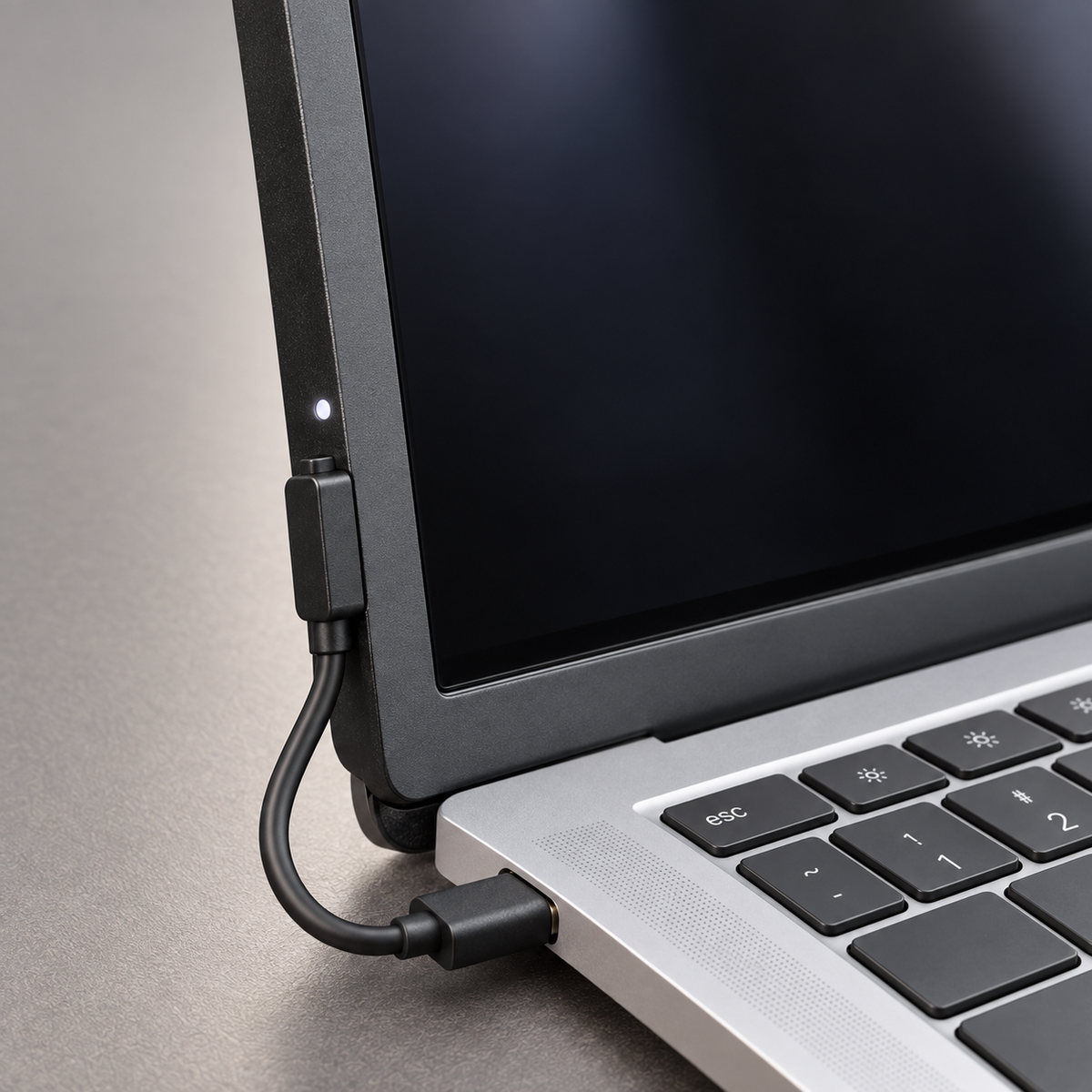
The supplied connection path links your MacBook to the frame’s lower-left magnetic connector.
Reach with a finger or use the documented pen for supported interactions.
Why touch?
Keep the control of your keyboard and trackpad, then add direct touch for the moments when pointing, selecting, or moving through on-screen content feels more natural.

Use touch when it feels more direct; your keyboard and trackpad remain right where they are.
How it works
TOUCHEVA is designed around MacBook and macOS for a direct, driver-free setup.

Face the frame toward the screen and align it with the display-area edge without covering the visible display.

Connect the USB-C end to your MacBook and the magnetic end to the lower-left connector on the frame. The indicator turns on after connection.

Once connected, use your finger or the supplied pen directly on the display—no separate driver download required.
No display replacement, internal modification, or separate driver installation required.
Work
Reach for supported on-screen controls during focused work while your keyboard and trackpad stay exactly where you expect them.

Concept scene showing a focused work setting.
Present
Use direct interaction to point to supported on-screen content and guide attention while you talk through an idea.

Concept scene showing direct interaction during a presentation.
Collaborate
Reach into a shared canvas to move a note, connect a step, or guide attention during a working session.

Concept scene using a generic digital-whiteboard interface.
Review
Point directly to a chart, select a data point, or bring a result into focus while keeping the keyboard close.

Concept scene using a generic analytics interface.
Study
Bring direct input into reading, reviewing, and study sessions without giving up the keyboard and trackpad you already use.

Concept scene showing direct interaction during study.
Research
Move between reading and note review with a direct point of contact, without leaving the familiar MacBook workspace.

Concept scene using a generic research interface.
Edit
Select a clip or point to a moment directly on screen while the keyboard and trackpad remain available for the rest of the edit.

Concept scene using a generic video-editing interface.
Two input options
Reach with a finger for quick control, or pick up the supplied pen when a more precise point of contact feels useful.

A closer look at the hardware

The current product is a standalone rectangular front frame with no broad back plate.

Current hardware photos show the fixing clips positioned along the upper edge.

The lower-left magnetic seat receives the cable connection beside the visible indicator.

The frame follows the display edge without covering the visible display when aligned as shown in the guide.
Input and connection

Tap, select, scroll, and move through on-screen content directly on the display area.

Use the supplied pen for writing, pointing, and selection when you want a finer contact point.

The cable connects USB-C at the MacBook to the magnetic connector at the lower-left of the frame.
Both input options work through the same direct connection to your MacBook.
Currently documented in the box
Current manufacturer materials document the following components for the touch-frame set.

The current front-only frame that sits around the existing display.
USB-C at the MacBook end with a magnetic connection at the frame end.
Documented for supported writing and selection input.
Final retail packaging and included items will be confirmed before ordering opens. MacBook and display are not included.
Product details
TOUCHEVA is a front touch-frame accessory, not a display. The current guide shows magnetic placement around the display edge and a USB-C-to-magnetic cable connection at the lower left.
TOUCHEVA is designed for macOS and works as a plug-and-play touch input device without a separate driver installation. The current specification lists multi-touch and pen input.
The documented 15-inch example measures 344.2 × 241.3 × 21.6 mm overall. Dimensions vary by frame size. This figure is not the frame-profile thickness. Final removal, lid-closing, and travel guidance will be published before purchase.
No matching questions. Clear your search or choose another topic.
Frequently asked questions
TOUCHEVA is a front touch-frame accessory designed to add direct finger and pen input to a MacBook display. It connects by cable, works with macOS without a separate driver, and does not contain a screen.
No. The product is the separate front touch frame. You provide the MacBook and its existing display.
TOUCHEVA is designed for MacBook and macOS. If more than one physical frame size is offered, simply choose the size shown in the product options—no separate system check is required.
The current guide shows magnetic placement aligned with the display edge. A cable connects USB-C at the MacBook to the magnetic connector at the lower-left of the frame.
No. TOUCHEVA is plug and play on macOS and does not require a separate driver installation.
Yes. The current specification lists multi-touch input. The exact gesture available can still vary by application.
The exact gesture and pen-feature matrix has not yet been published. Pressure sensitivity, tilt, hover, palm rejection, and app-specific behavior should not be assumed until listed as supported.
No screen is included or replaced. TOUCHEVA is a separate frame positioned around the existing display. Final removal and screen-contact guidance will be published before ordering.
Final lid-clearance, removal, storage, and travel instructions are still being verified. Do not close or transport the MacBook with the frame attached unless the final product guide explicitly permits it.
No Apple authorization or certification has been provided. TOUCHEVA is an independent accessory for MacBook and is not sponsored or endorsed by Apple.
These policies are being finalized and will be displayed before purchasing opens. No shipping time, return window, or warranty term should be assumed until it appears on the store.
No matching questions. Clear your search or choose another topic.
Touch begins here
Keep the MacBook you know. Add the direct control it was missing.
Touch frame accessory only. MacBook and display not included.